


HTTPX Library
Among the three, HTTPX is the most innovative. It provides a friendly, Requests-style interface with top-notch async support. You can get started with direct, sync calls, transition over to AsyncClient as your needs grow and enable HTTP/2 when you want it. It also has simple controls for timeouts and connection limits, making it an easy upgrade when Requests feels constrained and you want better performance without a huge hurdle to learn.
Install HTTPX
pip install httpx
Quick GET with HTTPX (sync)
import httpxwith httpx.Client(timeout=10.0) as client:resp = client.get("https://httpbin.org/json")resp.raise_for_status()print(resp.json())
Send JSON with HTTPX (sync)
import httpxpayload = {"name": "alice", "active": True}with httpx.Client(timeout=10.0) as client:resp = client.post("https://httpbin.org/post", json=payload)resp.raise_for_status()print(resp.json()["json"])
First async call with HTTPX
import asyncioimport httpxasync def main():async with httpx.AsyncClient(timeout=10.0) as client:resp = await client.get("https://httpbin.org/get")resp.raise_for_status()print(resp.json()["url"])if __name__ == "__main__":asyncio.run(main())
Why teams pick HTTPX
- Familiar mental model with an async option when needed
- Optional HTTP/2 can improve latency for same-host parallel requests
- Timeouts and connection limits are first class and easy to tune
Where HTTPX fits in your stack
HTTPX feels like Requests, yet it adds async and HTTP/2 for projects that may need more scale. If you do not need deep socket or DNS tuning or a built-in server, HTTPX offers most of the benefits with less cognitive load than AIOHTTP. For very small, sequential scripts, Requests can still be the lowest friction choice.
Requests Library
Requests is the classic choice known for readability and minimal setup. For scripts, CLIs, small integrations, and straightforward data pulls, it gets you working quickly with less to think about.
Install Requests
pip install requests
Grab a resource with Requests
import requestsresp = requests.get("https://httpbin.org/json", timeout=10)resp.raise_for_status()print(resp.json())
Submit JSON data with Requests
import requestspayload = {"name": "alice", "active": True}resp = requests.post("https://httpbin.org/post", json=payload, timeout=10)resp.raise_for_status()print(resp.json()["json"])
Reuse a single Session
import requestswith requests.Session() as s:s.headers.update({"User-Agent": "demo-client"})r1 = s.get("https://httpbin.org/uuid", timeout=10)r2 = s.get("https://httpbin.org/ip", timeout=10)r1.raise_for_status(); r2.raise_for_status()print("UUID:", r1.json()["uuid"])print("IP:", r2.json()["origin"])
Why teams pick Requests
- Clean, readable API that is easy to maintain and teach
- Perfect for simple, linear programs that do not need async
- Huge ecosystem of examples and answers
When Requests is the right call
Use Requests when your flow is sequential and concurrency is low. If you later need async or HTTP/2, HTTPX is a natural follow-up without a large rewrite. For workloads already in asyncio or for many concurrent calls, AIOHTTP or HTTPX async will be more efficient than wrapping Requests in threads.
AIOHTTP Library
AIOHTTP has been the popular framework for asyncio workloads in Python for a long time and provides a powerful async client and a powerful web server all in one framework. It is fully asynchronous (no sync mode), and it takes a bit more time to set up compared to when using Requests or HTTPX. When it comes to performance, it gives finer control over connectors, DNS caching, SSL, and socket behavior and can send out tons of requests efficiently in batches. It works well with proxies and supports backpressure in order not to overwhelm target servers. When it is just a single call it can feel like a lot of overhead, but when you are doing a lot of concurrent I/O, or building a more complicated service, AIOHTTP gives you great throughput and control.
Install AIOHTTP
pip install aiohttp
Fetch with AIOHTTP (async)
import asyncioimport aiohttpasync def main():async with aiohttp.ClientSession() as session:async with session.get("https://httpbin.org/get") as resp:resp.raise_for_status()data = await resp.json()print(data["url"])if __name__ == "__main__":asyncio.run(main())
Post JSON with AIOHTTP (async)
import asyncioimport aiohttpasync def main():async with aiohttp.ClientSession() as session:payload = {"name": "alice", "active": True}async with session.post("https://httpbin.org/post", json=payload) as resp:resp.raise_for_status()data = await resp.json()print(data["json"])if __name__ == "__main__":asyncio.run(main())
Download a small file
import asyncioimport aiohttpasync def main():url = "https://httpbin.org/image/png"async with aiohttp.ClientSession() as session:async with session.get(url) as resp:resp.raise_for_status()content = await resp.read()with open("download.png", "wb") as f:f.write(content)print("Saved download.png")if __name__ == "__main__":asyncio.run(main())
Why teams pick AIOHTTP
- Scales to many in-flight requests with predictable resource usage
- Connector level settings match tricky targets and networks
- One ecosystem can power both your service and its outbound calls
When AIOHTTP makes the most sense
Select AIOHTTP if your application already depends on asyncio and you expect a lot of concurrency, for example, crawling, streaming, WebSocket clients, or broad fan-out to multiple APIs. AIOHTTP is advantageous when you have long-lived sessions, backpressure (via semaphores or queues) and when you can predict the resources usage at a scale. If you only have a few simple calls, you can use Requests and if you want to experiment with async but want to retain a sync option, then go for HTTPX.
HTTPX vs Requests vs AIOHTTP: Performance Comparison
We will send 200 GET requests to https://httpbingo.org/get with each library, measure how long it takes, compute requests per second, and count good vs bad responses.
1. Requests (sync)
The script bellow will open a session and send 200 sequential requests with the Requests library.
# bench_requests.pyimport timeimport requestsURL = "https://httpbingo.org/get"TOTAL = 200def main():ok, bad = 0, []t0 = time.perf_counter()with requests.Session() as s:for _ in range(TOTAL):try:r = s.get(URL, timeout=10)if r.status_code == 200:ok += 1else:bad.append(r.status_code)except requests.RequestException as e:bad.append(f"err:{e}")dt = time.perf_counter() - t0print("=== Requests ===")print(f"time: {dt:.2f}s rate: {TOTAL/dt:.1f} req/s")print(f"ok: {ok} bad: {len(bad)}")if bad:print("bad set:", set(bad))if __name__ == "__main__":main()

2. HTTPX (async)
Below, is a script that uses HTTPX to send 200 requests in a parallel with a small concurrency cap.
# bench_httpx.pyimport timeimport asyncioimport httpxURL = "https://httpbingo.org/get"TOTAL = 200LIMIT = 25 # max in flightasync def fetch(client, sem):async with sem:try:r = await client.get(URL, timeout=10)return r.status_codeexcept httpx.RequestError as e:return f"err:{e}"async def run_once():ok, bad = 0, []sem = asyncio.Semaphore(LIMIT)async with httpx.AsyncClient() as client:tasks = [fetch(client, sem) for _ in range(TOTAL)]for status in await asyncio.gather(*tasks):if status == 200:ok += 1else:bad.append(status)return ok, baddef main():t0 = time.perf_counter()ok, bad = asyncio.run(run_once())dt = time.perf_counter() - t0print("==== HTTPX ====")print(f"time: {dt:.2f}s rate: {TOTAL/dt:.1f} req/s")print(f"ok: {ok} bad: {len(bad)}")if bad:print("bad set:", set(bad))if __name__ == "__main__":main()

3. AIOHTTP (async)
The script below, has the same idea as HTTPX, but it uses its async client session and response handling.
# bench_aiohttp.pyimport timeimport asyncioimport aiohttpURL = "https://httpbingo.org/get"TOTAL = 200LIMIT = 25async def fetch(session, sem):async with sem:try:async with session.get(URL, timeout=10) as r:return r.statusexcept aiohttp.ClientError as e:return f"err:{e}"async def run_once():ok, bad = 0, []sem = asyncio.Semaphore(LIMIT)async with aiohttp.ClientSession() as session:tasks = [fetch(session, sem) for _ in range(TOTAL)]for status in await asyncio.gather(*tasks):if status == 200:ok += 1else:bad.append(status)return ok, baddef main():t0 = time.perf_counter()ok, bad = asyncio.run(run_once())dt = time.perf_counter() - t0print("=== AIOHTTP ===")print(f"time: {dt:.2f}s rate: {TOTAL/dt:.1f} req/s")print(f"ok: {ok} bad: {len(bad)}")if bad:print("bad set:", set(bad))if __name__ == "__main__":main()

Now that you've seen the results, you clearly saw that:
- Requests is the slowest, which is expected for a fully synchronous loop. In our test it delivered about 6.6 req/s.
- HTTPX jumps way ahead, finishing at 74.5 req/s, roughly 11.3x faster than Requests.
- AIOHTTP comes out on top, hitting 121.8 req/s, about 1.6x faster than HTTPX and roughly 18.5x faster than Requests.
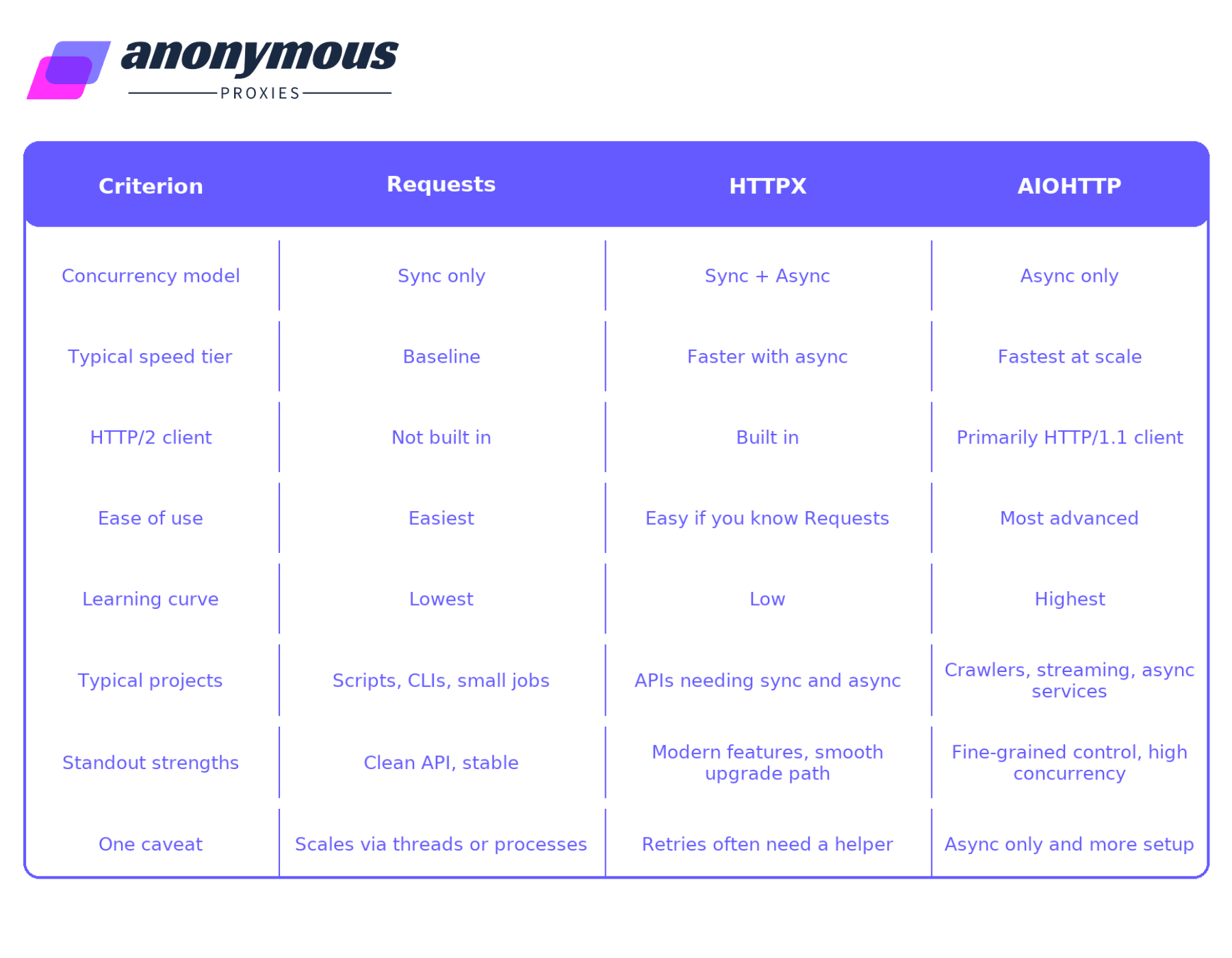
A Quick Comparison of HTTPX vs Requests vs AIOHTTP
Here is a reference table summarizing the major distinctions among each of Requests, HTTPX, and AIOHTTP.
Conclusion
As you've learned in this article, you should know now that you need to choose your HTTP requests library based on what's your project scope. For small tasks or light web scraping, especially when you route traffic through our residential proxies, choose Requests or HTTPX for simple, readable code. If you want one library that starts sync and can easily move to async, and can use HTTP/2 when available, pick HTTPX as your default. If your app already uses asyncio and you expect lots of concurrent calls, long lived sessions, and tight control, go with AIOHTTP.
If you have any question, don't hesitate to contact our support team which is always there for you.